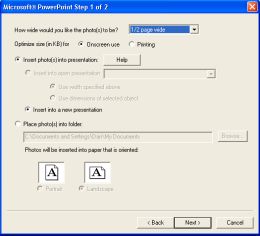
Reduce photos as you insert them into Word or PowerPoint to create smaller documents for faster emailing and sharing

Prepare photos for Microsoft® Word

  • Insert individual photos or collections of photos
  • Select target width on page
  • Select optimum compression (screen or print)
  • Automatically insert into new document
  • Automatically insert into open document
  • Automatically insert into template document (replaces all occurrences of <photo> with a photo. Great for real-estate agents, appraisers, and other people who need to insert photos into prepared document templates.
  • Prepare photos for manual insertion into a document at a later time.

Prepare photos for Microsoft® PowerPoint

  • Insert individual photos or collections of photos
  • Select target width on page
  • Select optimum compression (screen or print)
  • Automatically insert into new presentation
  • Automatically insert into open presentation
  • Automatically resize photos to fit within boundaries of selected object in presentation.
  • Prepare photos for manual insertion into a presentation at a later time.
 
Take the guided tour of Photolightning.


"Photolightning ... turns the often-tedious process of downloading, sharing and printing photos into a quick series of one or two-click steps."
 

  Order online using our secure servers, or via purchase order, fax, phone, check, or wire transfer. We accept VISA, MasterCard, American Express, and Discover.  


©2002-2006 Photolightning Corporation. All rights reserved.

Photolightning is digital camera software for Windows -- photo editing software & photo printing software that's renown for its ease of use. It's the perfect complement to a digital camera.